A crate manager for DJs, on the Mac
Your crate, filled and kept tidy.
MixVault pulls tracks from SoundCloud, YouTube and Spotify into one folder, shows each one’s key and BPM, cleans up messy names, and keeps the playlists you follow in Rekordbox.
Free to start. MixVault Plus is $8 a month.
What it does
-
SoundCloud, YouTube free
Pull
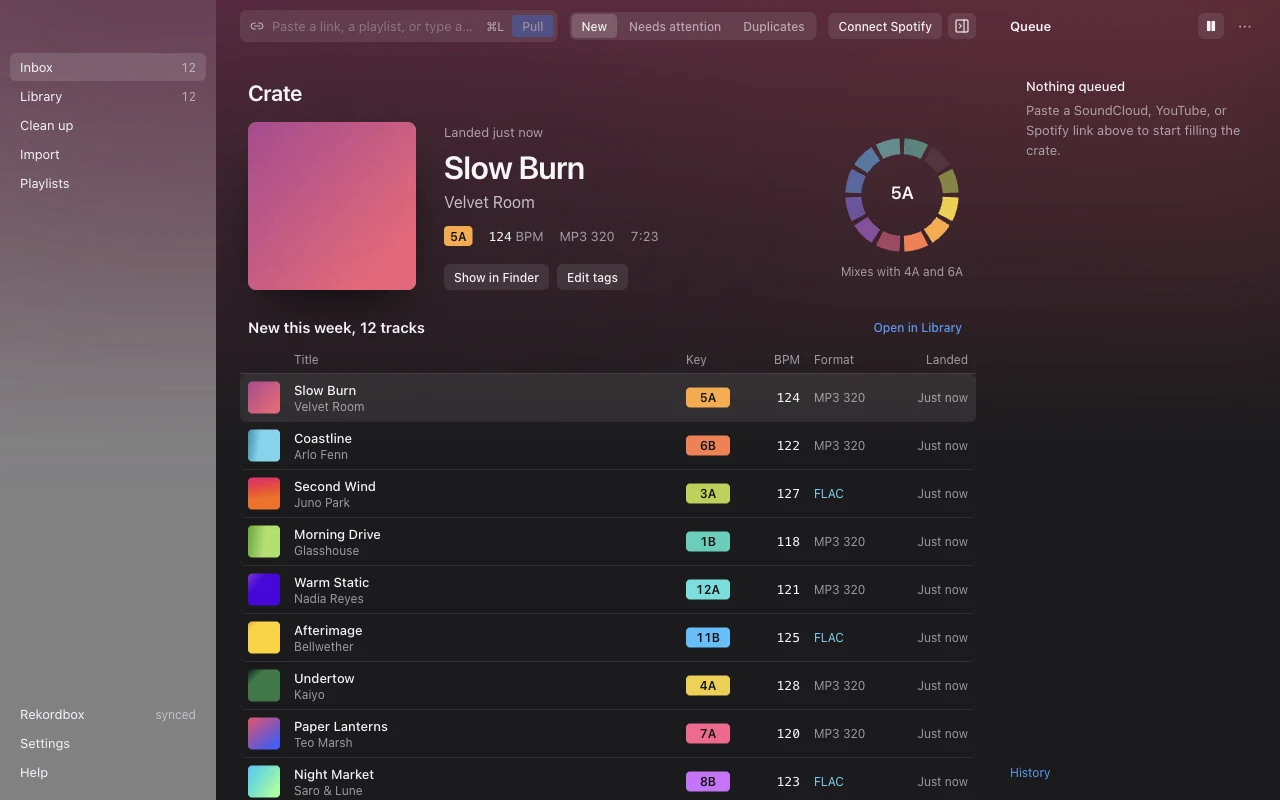
Paste links or a list of track names, or drop them on the window. Pulls wait in a queue, run a few at a time and skip anything already in the crate. Tracks land tagged and named Artist - Title, with artwork.
-
Free
Check
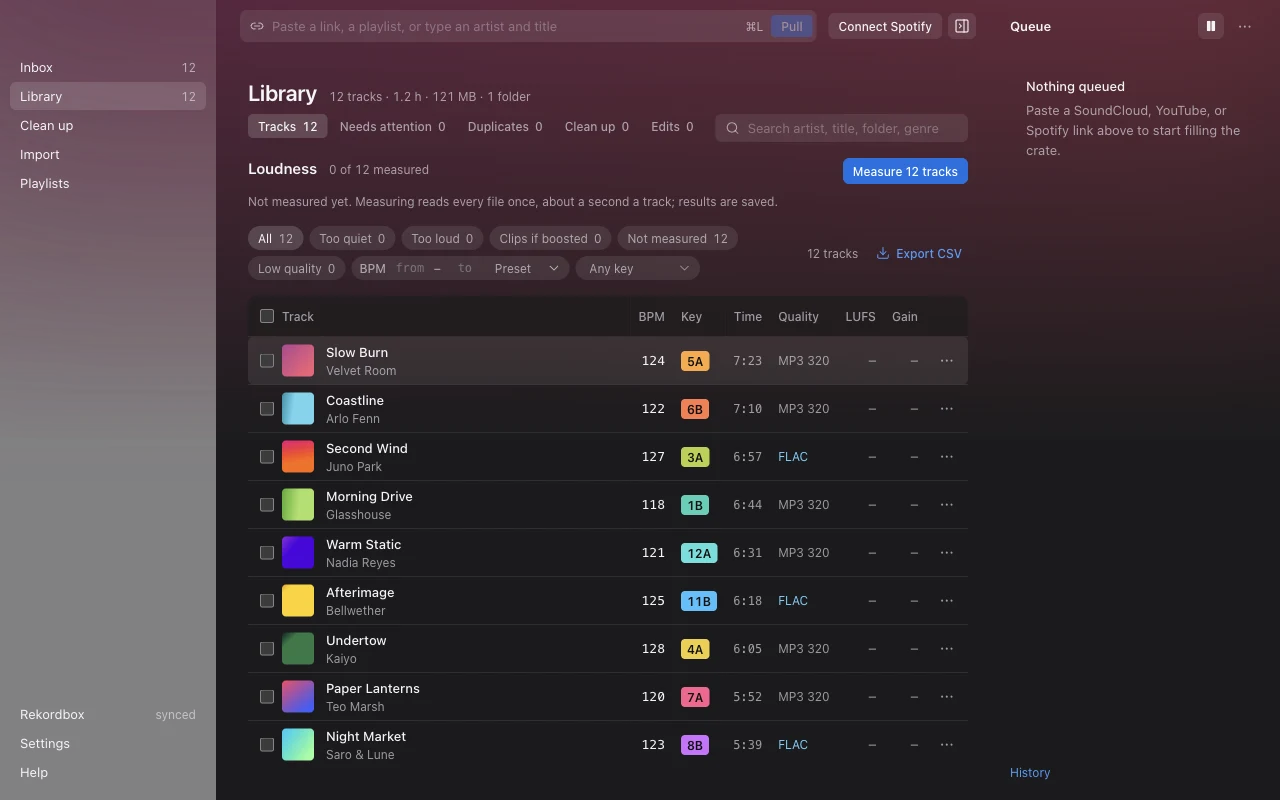
Every track’s key in Camelot colours, BPM, format and quality. Measure loudness, find duplicates and low-bitrate copies, and see which keys the track you’re on mixes with.
-
Free
Clean up
Suggested fixes for site tags in titles, bracketed prefixes, the artist repeated in the title and missing album, year and artwork. Edit tags yourself too. Every change can be undone.
-
Plus
Follow playlists into Rekordbox
Follow a SoundCloud, YouTube or Spotify playlist. MixVault checks it, pulls what’s new (by itself if you like), and the playlist shows up in Rekordbox through one bridge file you set up once.
-
Plus
Spotify and lossless
Pull Spotify playlists with nothing to set up. Tracks come from Soulseek first, in FLAC, AIFF or 320 MP3, with YouTube only as a fallback.
-
Plus
Import
Match a playlist against your Rekordbox collection and pull only the tracks you don’t have yet.
Pricing
Free
$0
- SoundCloud and YouTube links
- Track names, found on YouTube
- Key, BPM, quality, loudness and duplicates
- Clean up and tag editing, with Undo
MixVault Plus
$8 a month
- Everything in Free
- Spotify playlists, nothing to set up
- Lossless from Soulseek
- Followed playlists with automatic pulls
- The Rekordbox bridge
- Import: pull only what’s missing
Ask Baz for a key, then send $8 by Interac e-Transfer each month with your codeword in the message. Plus renews by itself.
Roadmap
Being tested
- Key and BPM detection for tracks that arrive without them.
- Harmonic order: sort a playlist so each track mixes into the next.
- Windows, with a first build in a friend’s hands.
Next
- Pick which new tracks to pull from a followed playlist, and how often it’s checked.
- Loudness to Rekordbox: write gain so tracks play at the same level.
- Renamed tracks stay found in Rekordbox after a clean-up.
- A signed app, so macOS opens it without the Privacy & Security step.
Later
- Bandcamp links.
- Mirror a playlist exactly, removing tracks it dropped.
- Several playlists at once in Import.
Questions
macOS says it can’t open MixVault
MixVault isn’t from an identified developer yet. Open it once, then go to System Settings › Privacy & Security and press Open Anyway. You only do this the first time.
How does paying work?
Ask Baz for a license key and enter it in Settings › MixVault Plus. Each month, send $8 by Interac e-Transfer with your codeword in the message (Settings shows it). Plus renews by itself within about 15 minutes. If a month runs out, MixVault goes back to the free version; nothing locks and nothing is deleted.
Does it work with my own Rekordbox library?
Yes. MixVault reads your Rekordbox collection export to see what you already have, and writes one bridge file Rekordbox reads as its rekordbox xml node. It never edits Rekordbox’s own database.
What does MixVault send about me?
Counts of which features you use, whether downloads worked, the version and your OS, so Baz knows what to improve. It never includes track names, links or files. Turn it off in Settings › Privacy.
Windows?
A first Windows build is being tested. The Mac version comes first until it’s ready.